Purpose and location
Manage portal identities and independent SIP extensions, including bulk operations.
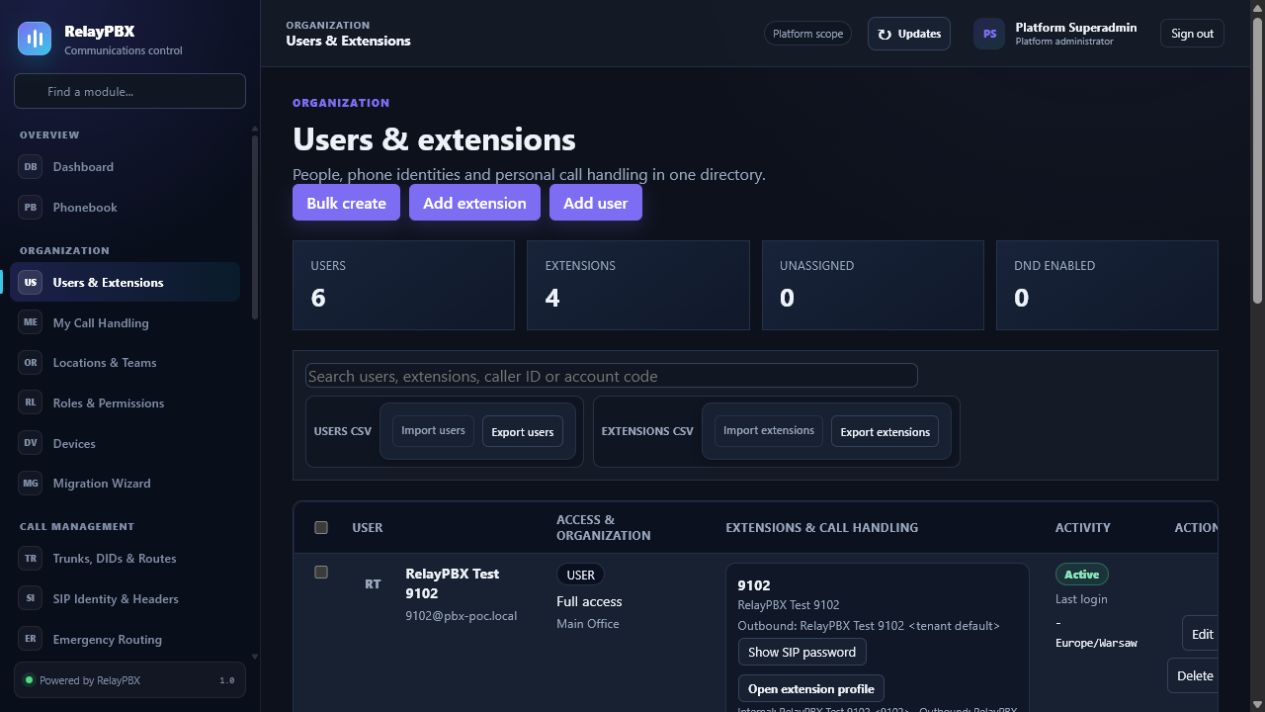
Open Organization → Users & Extensions. The available controls depend on the active edition, module entitlement, role and tenant scope.
Before you start
Use a tenant-scoped administrator unless the task genuinely requires platform access. Create plans, locations and roles before assigning them to people or endpoints.
Capture the current value or export the affected records before a bulk or routing change. This gives the operator a precise comparison point and makes a supported transaction undo easier to assess.
Step-by-step workflow
Complete the steps in order. Do not combine an initial configuration with unrelated cleanup; small, attributable changes are easier to test and reverse.
- Create a portal user only when interactive access is needed.
- Create device-only extensions separately or assign several extensions to one user.
- Set caller identity, service plan, class of service and voicemail.
- Use bulk create or CSV import for number ranges.
Field reference
Use the reference below while completing the form. Fields hidden by edition, module entitlement or role are intentionally unavailable to the signed-in user.
- User
- Portal identity, role, email and optional ownership of multiple extensions.
- Extension
- Tenant-unique dialable number; it may exist without a portal user.
- Internal caller ID
- Name and number presented on on-net calls.
- Outbound caller ID
- Name and number proposed for carrier-bound calls, subject to policy.
- Emergency caller ID
- Validated identity paired with a dispatchable location.
- Account code
- Optional customer-defined reporting and billing identifier.
- Service plan
- Entitlements and feature codes inherited by the extension.
- Class of service
- Allowed routes, patterns, destinations and features.
Acceptance checks
A saved record is only the beginning of validation. Run every relevant check below and retain the call-session ID, time and result when telephony is involved.
- Register the new extension and verify it appears online without exposing its SIP password.
- Call another extension and an approved outbound destination; confirm internal, outbound and emergency identities follow policy.
- Sign in as the assigned portal user and verify that only owned extensions and permitted modules are visible.
Common mistakes and safe recovery
If a check fails, stop adding changes. Restore the previous value or use a supported transaction undo, regenerate PBX configuration, then repeat the smallest failing test.
- A portal password and a SIP password serve different purposes and must never be reused.
- Do not enable unrestricted outbound calling until class of service, PIN policy and emergency location are verified.
What to include in a support case
Provide the tenant, module and object name, local time with timezone, expected result, observed result and the most recent successful state. For a call problem, include the logical call-session ID and the redacted SIP/SDP text diagnostic before requesting PCAP.
Never paste passwords, private keys, raw license payloads or unredacted customer media into a ticket. Use the one-time diagnostic grant and attachment controls when support requests additional evidence.