Purpose and location
Review recordings, evidence-bound copilots, controlled Virtual Receptionist and inbound Voice Agents, live agent guidance, security evidence and approved knowledge with tenant-controlled, human-reviewed AI.
Open Insights → RelayAI. The available controls depend on the active edition, module entitlement, role and tenant scope.
Before you start
Start with the narrowest tenant, participant and time range. Access to call evidence may expose personal data and must follow the assigned role and retention policy.
Capture the current value or export the affected records before a bulk or routing change. This gives the operator a precise comparison point and makes a supported transaction undo easier to assess.
Step-by-step workflow
Complete the steps in order. Do not combine an initial configuration with unrelated cleanup; small, attributable changes are easier to test and reverse.
- Select the tenant and confirm its AI privacy notice and processing boundary.
- Choose the local private runtime or explicitly allow the OpenAI provider.
- Set separate retention for generated text and enable the tenant policy.
- Generate recording insights, evidence-bound advisors or on-demand Live Agent Assist guidance.
- For Voice Agents, select a mandatory human fallback and approved knowledge, set call, concurrency and monthly-minute limits, then route a DID only after the runtime is ready.
- Review every advisory result and perform a controlled fallback, knowledge, transfer and message test before taking a separate human action.
Field reference
Use the reference below while completing the form. Fields hidden by edition, module entitlement or role are intentionally unavailable to the signed-in user.
- Provider
- Local installation-owned runtime or OpenAI API; the tenant cannot supply an arbitrary endpoint.
- Models
- Separate identifiers for audio transcription and structured analysis.
- Transcript retention
- Deletion interval for AI-generated text, independent from source telephony data.
- PII redaction
- Basic local masking of common e-mail addresses and phone numbers before text analysis.
- Call Quality Coach
- Seven coaching criteria bound to exact T#### redacted transcript references, without an overall employee score or automated action.
- Campaign readiness
- BLOCKED, NEEDS_REVIEW or READY based on an immutable aggregate campaign snapshot.
- WFM forecast
- Hourly queue demand, anonymous scheduled coverage and priority windows for planner review.
- Inbound intent
- Aggregate intent clusters, evidence counts, routing gaps and knowledge gaps from redacted inbound insights.
- Provisioning diagnostics
- Immutable tenant-device snapshot with P#### evidence, categorized fetch outcomes and read-only checks; no MAC, IP, URL, credential or raw error is sent to the model.
- Billing explanation
- Immutable aggregate rated-call totals by day and trunk with exact B#### evidence references; no charge, refund, balance, rate, tax or invoice mutation.
- Security investigation
- Immutable redacted alert and audit snapshot, exact evidence references, read-only checks and containment options requiring separate human approval.
- IVR prompt suggestions
- Editable wording guidance that cannot update an IVR automatically.
- Knowledge sources
- Tenant-approved source title, content hash and enabled state; source content remains private to the tenant.
- Knowledge citations
- Every grounded answer cites the exact approved source references used.
- Live Agent Assist
- On-demand guidance for the signed-in agent from approved tenant knowledge, with local PII redaction, exact citations and named review; no automatic reply or call/PBX control.
- Human review
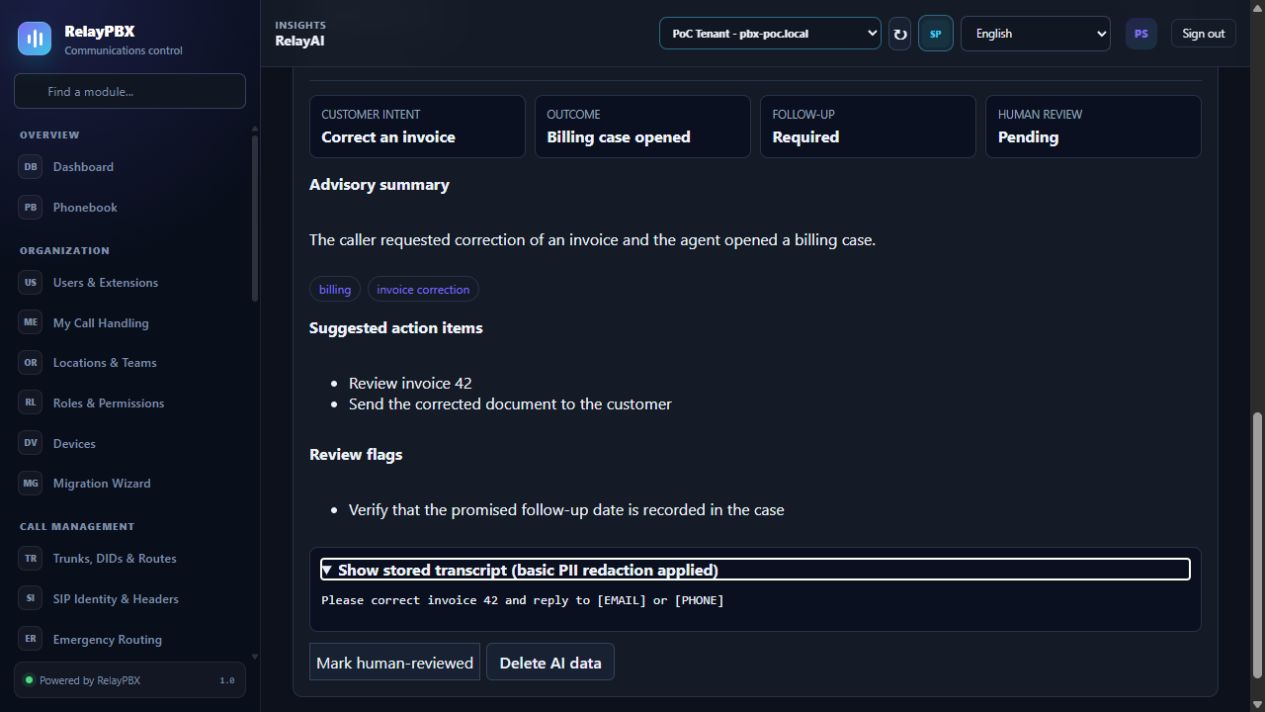
- Named, timestamped confirmation that an authorized person checked the advisory result.
- Delete AI data
- Immediately removes generated data while keeping the source recording, alert, configuration, campaign or call history.
Acceptance checks
A saved record is only the beginning of validation. Run every relevant check below and retain the call-session ID, time and result when telephony is involved.
- Use a disposable recording containing a test e-mail address and phone number; verify the stored transcript shows [EMAIL] and [PHONE].
- Generate Call Quality Coach for that recording; verify all seven criteria appear, POSITIVE and REVIEW observations cite valid T#### lines, NOT_OBSERVED is not a failure, and there is no employee score, ranking or apply action.
- Select a test campaign with granted, withdrawn and DNC aggregate states; verify no individual contact or number appears in the AI artifact.
- Generate a queue forecast and verify employee identity and individual performance data are absent.
- Generate an inbound intent review and verify audio, transcripts, caller numbers, recording IDs and agent identities are absent.
- Generate provisioning diagnostics and verify that findings cite only visible P#### rows while MAC and IP addresses, provisioning URLs, credentials and raw errors are absent; confirm there is no reboot, reprovision, reconfiguration or credential-rotation action.
- Generate a billing explanation and verify totals cite only B#### aggregate rows while caller numbers, destinations, CDR IDs, payments and invoices are absent.
- Generate a security investigation and verify raw actor, target and source identifiers, IP addresses and metadata are absent while every finding cites an exact visible evidence reference.
- Add two approved knowledge sources and verify every answer citation resolves to one of their exact references and titles.
- Ask a question unsupported by the approved sources and verify the copilot refuses to guess and reports missing information.
- In Agent Workspace request live guidance, verify exact citations, mark it reviewed and clear the AI data; confirm no reply, disposition, call control or configuration action is exposed.
- Confirm Campaign, WFM, Intent, Billing, Security, Knowledge and Live Agent Assist copilots expose no start, schedule, route, dial, charge, refund, balance, invoice, suppress, block, remediate, send or apply action.
- Confirm a second tenant cannot list, queue, review or delete the job or knowledge source.
- Restart the backend while a job is queued and verify the durable worker resumes it.
- Cancel the deletion prompt once, then confirm it and verify source telephony data remains available.
Common mistakes and safe recovery
If a check fails, stop adding changes. Restore the previous value or use a supported transaction undo, regenerate PBX configuration, then repeat the smallest failing test.
- RelayAI output is advisory and can be incomplete or wrong; never apply PBX, campaign, schedule, billing, security or employment decisions automatically.
- Campaign readiness is not legal approval; the customer remains responsible for consent, DNC, calling hours, recording and caller identity.
- Every Voice Agent must disclose AI, have a tested human fallback and stay within approved knowledge, transfers and limits. Autonomous outbound voice remains disabled.
- WFM workload is not an Erlang-C or SLA guarantee, and generic queue schedule blocks can overstate multi-queue coverage.
- Inbound Intent and IVR Prompt results do not change routing and must be tested through the ordinary IVR and call-flow tools.
- Security Investigation results show correlation, not proof of causation; containment options require a separate authorized human action and visible side-effect review.
- Knowledge Copilot and Live Agent Assist must refuse when approved excerpts are insufficient; cited output still requires human verification and is never sent automatically.
- Do not enable external processing until the tenant has the required notice, lawful basis and data-processing terms.
- Call Quality Coach is a human-review aid, not a performance scorecard; never use it as the sole basis for discipline, compensation or employment decisions.
- Employee emotion, personality, productivity and suitability scoring are not supported.
What to include in a support case
Provide the tenant, module and object name, local time with timezone, expected result, observed result and the most recent successful state. For a call problem, include the logical call-session ID and the redacted SIP/SDP text diagnostic before requesting PCAP.
Never paste passwords, private keys, raw license payloads or unredacted customer media into a ticket. Use the one-time diagnostic grant and attachment controls when support requests additional evidence.