Purpose and location
Import FusionPBX or VitalPBX configuration through a staged, tenant-scoped and reviewable migration.
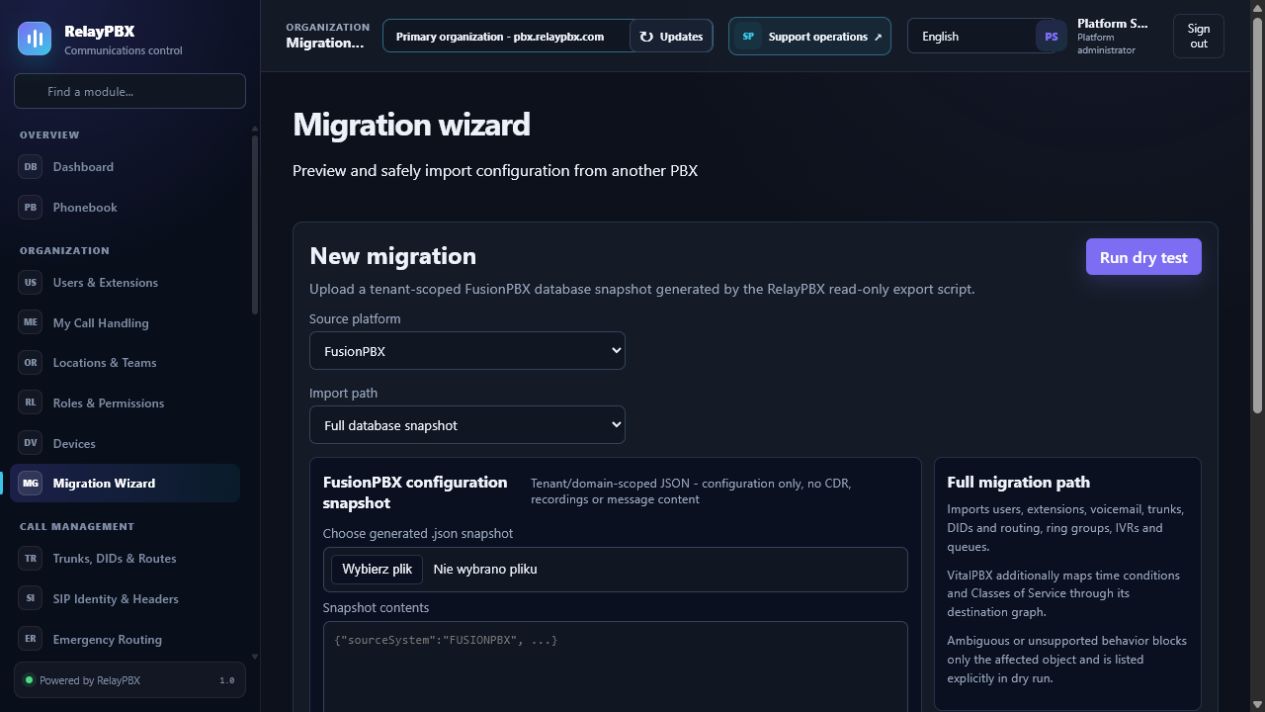
Open Organization → Migration Wizard. The available controls depend on the active edition, module entitlement, role and tenant scope.
Before you start
Use a tenant-scoped administrator unless the task genuinely requires platform access. Create plans, locations and roles before assigning them to people or endpoints.
Capture the current value or export the affected records before a bulk or routing change. This gives the operator a precise comparison point and makes a supported transaction undo easier to assess.
Step-by-step workflow
Complete the steps in order. Do not combine an initial configuration with unrelated cleanup; small, attributable changes are easier to test and reverse.
- Generate the read-only, anonymized source profile with the matching RelayPBX export script.
- Upload the source snapshot and run the dry test before any write.
- Review supported, ambiguous and unsupported objects and resolve every number or domain conflict.
- Create a migration checkpoint, apply in a maintenance window and validate the generated call graph.
- Keep the report and use the supported rollback action if acceptance fails.
Field reference
Use the reference below while completing the form. Fields hidden by edition, module entitlement or role are intentionally unavailable to the signed-in user.
- Source platform
- FusionPBX PostgreSQL or VitalPBX MySQL/MariaDB export profile.
- Import path
- Full snapshot or another supported normalized bundle.
- Dry test
- Tenant-scoped validation and object mapping without changing live data.
- Conflict policy
- Skip, replace or explicitly remap conflicting objects.
- Destination graph
- Typed links between DIDs, routes, time conditions, IVRs, groups, queues, extensions and voicemail.
- Migration report
- Created, skipped, ambiguous and failed records with reasons and source identifiers.
- Rollback checkpoint
- Pre-apply state used by the audited migration rollback workflow.
Acceptance checks
A saved record is only the beginning of validation. Run every relevant check below and retain the call-session ID, time and result when telephony is involved.
- Compare the dry-test counts with the source profile before applying.
- Verify extensions, voicemail, trunks, DIDs and every imported call-flow destination in the target tenant.
- Place focused calls through one simple and one multi-module imported route.
- Confirm a second tenant cannot read the snapshot, report or imported objects.
Common mistakes and safe recovery
If a check fails, stop adding changes. Restore the previous value or use a supported transaction undo, regenerate PBX configuration, then repeat the smallest failing test.
- Never upload a full production database when the read-only tenant-scoped export is sufficient.
- CDRs, recordings and secrets are excluded unless a separately approved migration scope explicitly includes them.
- Do not apply an import with unresolved ambiguous destinations.
What to include in a support case
Provide the tenant, module and object name, local time with timezone, expected result, observed result and the most recent successful state. For a call problem, include the logical call-session ID and the redacted SIP/SDP text diagnostic before requesting PCAP.
Never paste passwords, private keys, raw license payloads or unredacted customer media into a ticket. Use the one-time diagnostic grant and attachment controls when support requests additional evidence.